Showing posts with label Computer. Show all posts

Virtual Router

Virtual Router - Wifi Hot Spot for Windows 8, Windows 7 and 2008 R2


Project Description
The original open source Wifi Hotpot for Windows 7, Windows 8 and Windows Server 2012!

What is Virtual Router?
Virtual Router is a free, open source software based router for PCs running Windows 8, Windows 7 or Windows Server 2008 R2. Using Virtual Router, users can wirelessly share any internet connection (Wifi, LAN, Cable Modem, Dial-up, Cellular, etc.) with any Wifi device (Laptop, Smart Phone, iPod Touch, iPhone, Android Phone, Zune, Netbook, wireless printer, etc.) These devices connect to Virtual Router just like any other access point, and the connection is completely secured using WPA2 (the most secure wireless encryption.)

Where can Virtual Router be used?
Anywhere you are!
  •     Home
  •     Office
  •     School
  •     Airport
  •     Bus Station
  •     The Park
  •     Grandmas House
  •     The In-Laws
  •     Absolutely Anywhere!

No Advertising, No Hassle
Unlike similar applications, Virtual Router is not only completely Free, but will not annoy you with any advertisements. Also, since Virtual Router is not ad-supported, it does not track your web traffic the way other ad-supported applications do/can.

The Wireless Network create/shared with Virtual Router uses WPA2 Encryption, and there is not way to turn off that encryption. This is actually a feature of the Wireless Hosted Network API's built into Windows 7 and 2008 R2 to ensure the best security possible.

You can give your "virtual" wireless network any name you want, and also set the password to anything. Just make sure the password is at least 8 characters.

This project is written entirely in C#.

Website: http://virtualrouter.codeplex.com/

Virtual Router | 1.5MB
http://adf.ly/d0yh0
To Download, 
Click Download button then wait for 5 secs then click SKIP AD.
 
Please leave a comment and Like us on Facebook. Thank You!
Read more

Mozilla Firefox 26.0 Offline Installer

Mozilla Firefox 26.0


Bringing together all kinds of awesomeness to make browsing better for you.

Browsing Made Easy

Get to your favorite sites quickly – even if you don’t remember the URLs. Type your term into the location bar (aka the Awesome Bar) and the autocomplete function will include possible matches from your browsing history, bookmarked sites and open tabs.

Improved Interface

We’re always looking for ways to make your browsing easier and more efficient.

Tabs

Browse multiple sites at once, simply and easily. Each new site appears as a new tab
(not a new window) and can be accessed in one click. 

Stay in Sync

Sync seamlessly connects your desktop and mobile Firefoxes, so you can access your browsing history, passwords, bookmarks and even open tabs no matter which device you use. Access years of desktop browsing the first day you fire up your mobile, and use saved passwords from your desktop to fill out forms on your phone. 

Easy Search

The Web is a big place, but Firefox is ready to help you find whatever you’re looking for.

Session Restore

Session Restore instantly brings back your windows and tabs, restoring text you entered and any in-progress downloads. You can restart the browser without losing your place after you install an add-on or software update. And, if Firefox or your computer unexpectedly closes, you don’t have to spend time recovering data or retracing your steps through the Web. If you’re in the middle of typing an email, you’ll pick up where you left off, even down to the last word you typed.

Get Organized

There’s a lot of great stuff on the Web, Firefox is full of ways to help you keep track.

More Mozilla Firefox Features at https://www.mozilla.org/en-US/firefox/features/

Firefox Browser 26.0 | 22.92 MB
http://adf.ly/cvk6s

Download Firefox in your language

https://www.mozilla.org/en-US/firefox/all/

Please Like us on Facebook!


Read more

Intel's Fastest Processor


Intel Core i7-3970X Processor

Specification


Essentials
Processor Number   i7-3970X                      
Launch DateQ4'12
# of Cores6
# of Threads12
Cache15.0 MB
Clock Speed3.50 GHz
Max Turbo Frequency4.00 GHz
Cache15.0 MB
Bus/Core Ratio35
Bus TypeDMI
Instruction Set64-bit
Instruction Set ExtensionsSSE4.2, AVX
Lithography32 nm
Scalability-
Max TDP150
VID Voltage Range0.6V-1.35V

Memory Specifications
Max Memory Size (dependent on memory type)64 GB
Memory TypesDDR3-1066/1333/1600
# of Memory Channels4
Max Memory Bandwidth51.2
Physical Address Extensions-


Graphics Specifications
Processor Graphics  No                                
Graphics Base Frequency-
Graphics Max Dynamic Frequency-
Intel® Quick Sync Video-
Intel® InTru™ 3D Technology-
Intel® Wireless Display-
Intel® Flexible Display Interface (Intel® FDI)-
Intel® Clear Video HD Technology-
Dual Display Capable -
Expansion Options
PCI Express Revision  2.0                                
Max # of PCI Express Lanes40
PCI Express Configurations -
Package Specifications
Max CPU Configuration 1                                    
TCASE66.8°C
Package Size52.5mm x 45.0mm
Processing Die Size-
# of Processing Die Transistors-
Graphics and IMC Lithography-
Graphics and IMC Die Size-
# of Graphics and IMC Die Transistors-

Advanced Technologies
Intel® Hyper-Threading Technology Yes
Intel® Turbo Boost Technology  2.0                                 
Intel® Virtualization Technology for Directed I/O (VT-d) Yes
Intel® Trusted Execution Technology No
Intel® 64 Yes
Intel® Demand Based Switching-
Idle StatesYes
Enhanced Intel SpeedStep® TechnologyYes
Thermal Monitoring TechnologiesYes
Execute Disable Bit Yes
Intel® Demand Based Switching-


Read more

Turbo C

TURBO C


Turbo C is an Integrated Development Environment and compiler for the C programming language from Borland. First introduced in 1987, it was noted for its integrated development environment, small size, fast compile speed, comprehensive manuals and low price.

In May 1990, Borland replaced Turbo C with Turbo C++. In 2006, Borland reintroduced the Turbo moniker.

To Download:
Click Download and wait for 5 secs then click SKIP AD.

You can download the file extractor HERE


TurboC.rar | 2MB

Please leave a comment and Like us on Facebook. Thank You!
 
Read more

Firefox Student Ambassadors

Firefox Student Ambassadors


Who are the Firefox Student Ambassadors?
They are individuals who are passionate on Mozilla’s mission and they are those who promote the Firefox browser, Firefox OS and other Mozilla products and projects in their respective campuses or universities!

They are given opportunities to learn new skills, gain recognition and advance their leadership in the Mozilla Community! They can also be accepted into the Mozilla Representatives (ReMo) Program!

What Firefox Student Ambassadors do?
Firefox Student Ambassadors exists to raise the awareness of tools and resources that Mozilla has to offer in helping other contributors (especially other students) via some of the activities listed below:
  • Event Speakership
  • Recruiting Contributors
  • Event Organizing
  • Graphic Designing
  • Student Developers
  • Photographers
  • Event Bloggers / Documentation
How to Join the Firefox Student Ambassadors Program?
Joining is easy. One must be at least 18 years old (and above) and is currently enrolled or associated at any school or learning institution. YES, Professors and School Administrators are now welcome to be part of the program. Visit http://mozillaph.org/ffxstudents to register!

So, what’s next?
After registration, you are encouraged to create a Firefox Club — a group of Firefox Student Ambassadors at your respective school or campus. Students get to meet fellow Ambassadors in their schools and work as a team on events planning and growing the Mozilla Community at their institution. To check if there is already an existing club on your school or campus, please visit http://mozillaph.org/ffxclubsdirectory

What to do if there is no existing club on my school?
Gather all your friends, Classmates or Professor who want to join the Firefox Student Ambassador Program. Appoint a leader, who will be Mozilla Philippines Community’s contact person at your school or campus. Be sure to choose a name for your club. Please create a club via http://mozillaph.org/ffxclubs

So what are you guys waiting for? Come and Join the program. Keep the Firefox fire Blazing!

 EARIST FIREFOX CLUB  https://wiki.mozilla.org/EARIST_Firefox_Student_Ambassadors
Facebook Group https://www.facebook.com/groups/earist.Firefox.Student.Ambassadors/

Club Leader Raymark A. Palaña
(BS Computer Engineering - 5th Year)

Read more

Types of RAM (Ramdom Access Memory)

Types of RAM

There are many different types of RAM which have appeared over the years and it is often difficult knowing the difference between them both performance wise and visually identifying them. This article tells a little about each RAM type, what it looks like and how it performs.

FPM RAM
FPM RAM, which stands for “Fast Page Mode RAMÃ is a type of Dynamic RAM (DRAM). The term "Fast Page Mode" comes from the capability of memory being able to access data that is on the same page and can be done with less latency. Most 486 and Pentium based systems from 1995 and earlier use FPM Memory. 
FPM RAM

EDO RAM
EDO RAM, which stands for "Extended Data Out RAM" came out in 1995 as a new type of memory available for Pentium based systems. EDO is a modified form of FPM RAM which is commonly referred to as "Hyper Page Mode". Extended Data Out refers to fact that the data output drivers on the memory module are not switched off when the memory controller removes the column address to begin the next cycle, unlike FPM RAM. Most early Penitum based systems use EDO. 
EDO RAM

SDRAM
SDRAM , which is short for Synchronous DRAM is a type of DRAM that runs in synchronization with the memory bus. Beginning in 1996 most Intel based chipsets began to support SDRAM which made it a popular choice for new systems in 2001.
SDRAM is capable of running at 133MHz which is about three times faster than FPM RAM and twice as fast as EDO RAM. Most Pentium or Celeron systems purchased in 1999 have SDRAM.
SD RAM

DDR RAM
DDR RAM, which stands for "Double Data Rate" which is a type of SDRAM and appeared first on the market around 2001 but didn’t catch on until about 2001 when the mainstream motherboards started supporting it. The difference between SDRAM and DDR RAM is that instead of doubling the clock rate it transfers data twice per clock cycle which effectively doubles the data rate. DDRRAM has become mainstream in the graphics card market and has become the memory standard.
DDR RAM

DDR2 RAM
DDR2 RAM, which stands for "Double Data Rate 2" is a newer version of DDR which is twice as fast as the original DDR RAM. DDR2RAM came out in mid 2003 and the first chipsets that supported DDR2 came out in mid 2004. DDR2 still is double data rate just like the original DDR however DDR2-RAM has modified signaling which enables higher speeds to be achieved with more immunity to signal noise and cross-talk between signals.
DDR2 RAM

RAMBUS (RIMM) RAM
RAMBUS RDRAM is a type of ram of its own, it came out in 1999 and was developed from traditional DRAM but its architecture is totally new. The RAMBUS design gives smarter access to the ram meaning that units can prefetch data and free some CPU work. The idea behind RAMBUS RAM is to get small packets of data from the RAM, but at very high clock speeds. For example, SD RAM can get 64bit of information at 100MHz where RAMBUS RAM would get 16bits of data at 800MHz. RIMM ram was generally unsuccessful as Intel had a lot of problems with the RAM timing or signal noise. RD RAM did make an appearance in the Sony Playstation 2 and the Nintendo 64 game consoles. 
RD RAM


Please leave a comment and like us on Facebook. Thank You!
Read more

Types of ROM (Read-Only-Memory)

Types of ROM (Read-Only-Memory)

As you may already know ROM is read only memory. This means that the processor can only read the memory on the ROM but cannot write memory on it. This is done so that the memory on the ROM is not lost as it may contain vital system information.
 

Now as regards to your question, there are namely 4 types of ROM:-

* ROM (Read Only Memory)
This is your normal ROM that is found in most PC's. It is designed similar to a processor, and is made out of silicon. Data can be read from it but you cannot write data on it. This is the permanent memory of the system. It is used to perform a single function.

* PROM (Programmable ROM)
PROM is programmable ROM. Sometimes we may want to write some data on the ROM. In such cases we use PROM. Data can be written on it using special equipment. It is important to note that data can be written on PROM only once but it cannot be removed from the PROM.

* EPROM (programmable ROM from which data can be programmed and erased)
EPROM is programmable ROM from which data can be programmed and erased. Note that programming and erasing is not limited to just one time. It is done using ultra violet light. The downside to this that i requires additional hardware to program it. EPROM is now used in most bios systems. This provides flexibility for the programmer.

* EEPROM (Extension of EPROM)

EEPROM is the next generation of ROM. It takes EPROM to the next level. As compared to EPROM, EEPROM can be programmed using software technology. The user himself can program the ROM using system software. The main advantage of this is you don't need special hardware to program it. This saves the programmer a lot of money. This has become the dominating force in the BIOS ROM market. Majority of the motherboards these days come with EEPROM.
 
 
Please leave a comment and like us on Facebook! Thank You!

Read more

Robotics Software ER 5, ER 9

ROBOTICS SOFTWARE ER9


Robotics is the branch of technology that deals with the design, construction, operation, and application of robots, as well as computer systems for their control, sensory feedback, and information processing. These technologies deal with automated machines that can take the place of humans in dangerous environments or manufacturing processes, or resemble humans in appearance, behavior, and/or cognition. Many of today's robots are inspired by nature contributing to the field of bio-inspired robotics

ROBOTIC.RAR | 30MB
 

To Download:
Click the Link, wait for 5secs, then click SKIP AD.

How to install the Program?

Download the ROBOTICS.RAR File (You must have file extractor)
You can download the file extractor HERE
Install the Extractor.

Extract the ROBOTICS.RAR (Right Click, Extract Here)

Open the folder Robotics -> Install 
Find the SETUP.EXE (Type - Application)

Part I

Run SETUP.
Click Next.
Click Yes.
Choose RoboCell
Click Next
Choose SCORBOT -ER9
Click Next
Choose English
Click Next
Enter the SERIAL KEY (Can be found on the root folder ROBOTIC.TXT)
Click Next
Click Next
Click Next (Do not change anything)
Message will Prompt
Click NO
Choose No, I will restart my computer later.
Finish

Part II

Run Setup AGAIN.
Click Next.
Click Yes.
This time, choose SCORBASE
Click Next
Choose SCORBOT -ER9
Click Next
Choose English
Click Next
Enter the SERIAL KEY (Can be found on the root folder ROBOTIC.TXT)
Click Next
Click Next
Click Next (Do not change anything)
Message will Prompt
Click NO
Choose Yes, I want to restart my computer now.
Finish

Computer will restart now.
Installation Complete.

You can now make your own program.

Please leave a comment and like us on Facebook.
Read more

Loading Business 1 SIM ALL NETWORKS plus ONLINE GAMES

LOADING BUSINESS
1 SIM ALL NETWORKS


 Powered By:

LoadCentral is the most successful distribution solution provider for all prepaid services in the country today.

It facilitates the dispensing of airtime credits via SMS or a web-interface. This system can dispense electronic PINs (e-PINs) and even directly top-up credit into a subscriber’s account. With LoadCentral, any person with a cellular phone or PC with internet connection that has been registered into the LoadCentral platform can dispense and retail prepaid card products without even carrying any sort of prepaid card inventory. A LoadCentral Retailer can now either sell e-PINs of any brand of prepaid products, or even top-up and directly send load into subscriber’s account with a few simple steps using his mobile phone or PC with internet connection.

Uniwiz Trade Sales, Inc. developer and owner of the undisputed number one universal loading platform in the country today LOADCENTRAL, is formerly owned by ComWorks Inc. the leading distributor of E-Loads, Physical Call Cards, Prepaid Internet Cards, Online Gaming Cards, Satellite Cards and others in the Philippines. ComWorks organized Uniwiz Trade Sales, Inc. on April 2005 to further expand its already vast distribution network.


Packages:
Sub-Dealer Package Php 3,888.00
Promo Php 3,500.00 until June 30, 2013
Package Inclusions:
- Free Php 1,000 Loadwallet
- Lifetime Membership
- Register Unlimited Retailers
- Earn 1-3% on sales of all your retailers
- 5 Pcs of Loadcentral Posters
- 1 Copy of Dealer Manual
- 1 Copy of Retailer Manual (Softcopy and Hardcopy)
- Softcopy of Printable Ads

Retailer Package Php 500.00
Promo Php 300.00 until May 31, 2013
Package Inclusions:
- Free Php 50 Loadwallet
- Lifetime Membership
- Earn 9-13% on every product sold
- 1 Copy of Retailer Manual (Softcopy and Hardcopy)
- Softcopy of Printable Ads
Loadwallet Replenishment through Bank Deposit
Banco De Oro (BDO) | Bank of the Philippines Island (BPI) | METROBANK
UNIWIZ TRADE SALES INC Bank Account 
 OPEN NATIONWIDE - PHILIPPINES
For more information, please contact site administrator using the information below.
Call or Text the following numbers for faster transaction.
+639 305372810 (Smart)
+639 328433563 (Sun Cellular)

THANK YOU & GOD BLESS 
Read more

Ascii Tables 255

Ascii Tables


The American Standard Code for Information Interchange (ASCII /ˈæski/ ASS-kee) is a character-encoding scheme originally based on the English alphabet. ASCII codes represent text in computers, communications equipment, and other devices that use text. Most modern character-encoding schemes are based on ASCII, though they support many additional characters.

ASCII developed from telegraphic codes. Its first commercial use was as a seven-bit teleprinter code promoted by Bell data services. Work on the ASCII standard began on October 6, 1960, with the first meeting of the American Standards Association's (ASA) X3.2 subcommittee. The first edition of the standard was published during 1963, a major revision during 1967, and the most recent update during 1986. Compared to earlier telegraph codes, the proposed Bell code and ASCII were both ordered for more convenient sorting (i.e., alphabetization) of lists, and added features for devices other than teleprinters.

ASCII includes definitions for 128 characters: 33 are non-printing (many now obsolete) that affect how text and space are processed and 95 printable characters, including the  (which is considered an invisible graphic). The IANA prefers the name US-ASCII to avoid ambiguity. ASCII was the most commonly used character encoding on the World Wide Web until December 2007, when it was surpassed by UTF-8.


Click the Link, wait for 5 secs then click SKIP AD!

Please leave a comment and like us on Facebook! Thank You
Read more

Deep Freeze Protection

Deep Freeze Protection


Faronics Deep Freeze Enterprise makes PCs indestructible. It protects endpoints by Freezing the desired configuration set by you – the IT professional. Any unwelcome or unwanted changes users make while in-session are prevented from sticking. It’s really simple. By restarting your computers, systems are returned to the desired state. Meanwhile, user data can be stored safely on a network drive or in a ThawSpace to be retained across reboots. This helps machines run smoothly and efficiently, while giving you more up-time and boosting user productivity. The built-in Deep Freeze Enterprise Console or Core Console makes life even easier.

Deep Freeze’s central management capabilities allow you to enjoy the benefits of customizing, deploying, and managing Deep Freeze on your endpoints from one central location. Need to manage Windows Updates? Simply download them while Frozen and they’re automatically applied when machines are Thawed. Once the process is finished, machines are automatically returned to their Frozen state.

Since Deep Freeze ensures 100% workstation recovery with every restart, you can watch that mountain of support tickets shrink. Customers report an average reduction of 63%. You can also forget about accidental configuration changes, malicious software, and operating system degradation. Now you and your IT staff can get more sleep, worry less, and maybe even leave the office on time once in a while.

Deep Freeze | 29 MB

Please leave a comment and Like us on Facebook! Thank You!

Read more

WinRar 4.10 32bit + 64bit

Winrar 4.10 32bit & 64bit with crack


http://www.winrarfreedownload.co/wp-content/uploads/2012/03/winrar-for-free.png
WinRAR is an advanced data compression utility that supports a wide array of format including RAR, ZIP, CAB, ARJ, LZH, ACE, TAR, GZip, UUE, ISO, BZIP2, Z and 7-Zip. It enables you to create, organize and manage archives in a comfortable and quick manner.

The complex compression algorithm it uses creates small archives, saving disk space and enabling faster file sharing. Audio and graphics files benefit from a special archiving algorithm, one that doesn’t make a compromise on quality. It includes Windows Explorer shortcuts for easy access and supports drag and drop as well.

WinRAR also provides possibilities to split archives into several volumes; this way, a large archive is divided into other smaller ones, which makes the perfect way to share huge files.

In case you wish to secure your files, you can always protect your data with a password, while the 'Repair' function comes in handy whenever you try to fix a broken archive.

Besides the fact that it does a great job when it comes to compressing files, WinRAR also integrates dedicated features that allow you to manipulate archives with a single click. You can backup the files you're about to compress, you can test the archived files and you can even perform virus scans before decompressing, without putting the data stored on your computer at risk.

During our tests, the compression and decompression process worked amazingly fast, and that should happen in your case too, at least if your computer is able to handle the task. The only problems you could experience are strictly related to hardware resources, as working with 3 or 4 archives at the same time could be a bit overwhelming for slower computers.

All in all, WinRAR remains the industry-standard in the compression category. It allows you to handle the most popular compression formats using a single interface and at very high speeds provided by the complex engine hidden under the hood

Download Link: winrar 32bit and 64bit with crack

Pls leave a comment and like us on Facebook. Thank You!!
Read more

Microsoft Security Essentials

Use Microsoft Security Essentials to help guard against viruses, spyware, and other malicious software. It provides real-time protection for your home or small business PCs.

http://www.microsoft.com/global/security/publishingimages/pc-security/computerstatusprotected_web.jpg


What is Microsoft Security Essentials?

There are a host of nasty intruders on the Internet including viruses, trojans, worms and spyware. Microsoft Security Essentials offers award-winning protection against these intruders without getting in your way.
The best brains and brawn in the background
Microsoft Security Essentials is built for individuals and small businesses, but it’s based on the same technology that Microsoft uses to protect giant businesses (security products like Microsoft Forefront, the Malicious Software Removal Tool, and Windows Defender). We have a whole team watching for new threats and coming up with ways to squash them.
We’re proud to have received great recognition for the protection we offer: the VB100 award from Virus Bulletin Ltd., Checkmark Certification from West Coast Labs, and certification from the ICSA Labs.
Westcoast Labs   ICSA Labs   Virus Bulletin
Easy to get, easy to use
Downloading and installing Microsoft Security Essentials is free and easy. Once you have installed it, the software updates automatically once a day. We’re constantly tracking new threats and we keep your PC updated to help protect you. You don’t have to do anything.
Microsoft Security Essentials uses green, yellow and red color codes to designate the security status of your PC and a color-coded icon in the taskbar tells you at a glance if your attention is needed. It’s simple—when you’re green, you’re good. However, if there’s a red or yellow threat, Microsoft Security Essentials will alert you and recommend what to do (you can act directly from the notification area without having to enter the application).
Runs quietly without hurting PC performance
Microsoft Security Essentials runs quietly in the background. You’ll only be alerted when there are specific actions to take. When you’re away or busy, Microsoft Security Essentials can take the default action on your behalf and you can open the program later to review and undo those actions if you wish.
Microsoft Security Essentials is efficient and compact. Scans and updates are scheduled to run when the PC is idle and the software works in a way that your PC is still snappy when you’re using it. All this makes Microsoft Security Essentials friendly for all sorts of computers—your old PC, your new PC, your laptop, as well as your little netbook.

Download Installer Here: VISTA / WINDOWS 7 32-BIT
                                   VISTA / WINDOWS 7 64-BIT 

Download Updates Here:  VISTA / WINDOWS 7 32-BIT 
                                    VISTA / WINDOWS 7 64-BIT 


Thank You. Like Us on Facebook. Please leave a comment.
Read more

The Five Generations of Computers


The history of computer development is often referred to in reference to the different generations of computing devices. Each generation of computer is characterized by a major technological development that fundamentally changed the way computers operate, resulting in increasingly smaller, cheaper, more powerful and more efficient and reliable devices. Read about each generation and the developments that led to the current devices that we use today.

First Generation (1940-1956) Vacuum Tubes

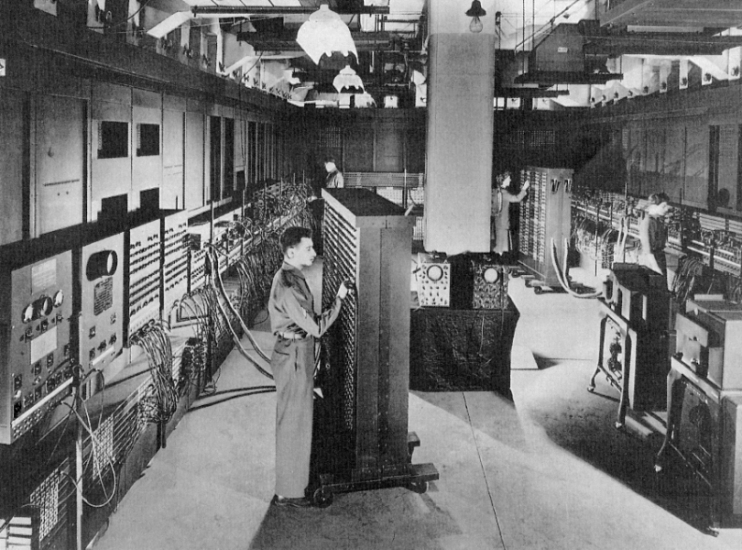
The first computers used vacuum tubes for circuitry and magnetic drums for memory, and were often enormous, taking up entire rooms. They were very expensive to operate and in addition to using a great deal of electricity, generated a lot of heat, which was often the cause of malfunctions.

First generation computers relied on machine language, the lowest-level programming language understood by computers, to perform operations, and they could only solve one problem at a time. Input was based on punched cards and paper tape, and output was displayed on printouts.

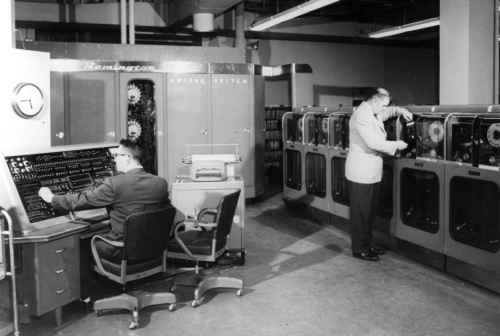
The UNIVAC and ENIAC computers are examples of first-generation computing devices. The UNIVAC was the first commercial computer delivered to a business client, the U.S. Census Bureau in 1951.


The first computers used vacuum tubes for circuitry and magnetic drums for memory, and were often enormous, taking up entire rooms. They were very expensive to operate and in addition to using a great deal of electricity, generated a lot of heat, which was often the cause of malfunctions.


First generation computers relied on machine language, the lowest-level programming language understood by computers, to perform operations, and they could only solve one problem at a time. Input was based on punched cards and paper tape, and output was displayed on printouts.


The UNIVAC and ENIAC computers are examples of first-generation computing devices. The UNIVAC was the first commercial computer delivered to a business client, the U.S. Census Bureau in 1951.

Second Generation (1956-1963) Transistors

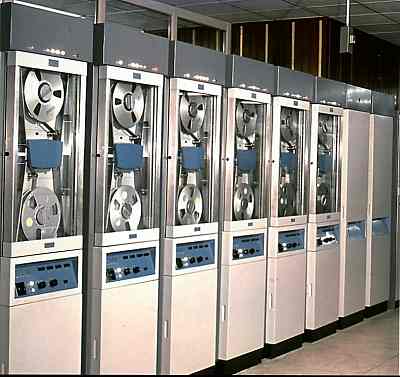
Transistors replaced vacuum tubes and ushered in the second generation of computers. The transistor was invented in 1947 but did not see widespread use in computers until the late 1950s. The transistor was far superior to the vacuum tube, allowing computers to become smaller, faster, cheaper, more energy-efficient and more reliable than their first-generation predecessors. Though the transistor still generated a great deal of heat that subjected the computer to damage, it was a vast improvement over the vacuum tube. Second-generation computers still relied on punched cards for input and printouts for output.

Second-generation computers moved from cryptic binary machine language to symbolic, or assembly, languages, which allowed programmers to specify instructions in words. High-level programming languages were also being developed at this time, such as early versions of COBOL and FORTRAN. These were also the first computers that stored their instructions in their memory, which moved from a magnetic drum to magnetic core technology.

The first computers of this generation were developed for the atomic energy industry.


Transistors replaced vacuum tubes and ushered in the second generation of computers. The transistor was invented in 1947 but did not see widespread use in computers until the late 1950s. The transistor was far superior to the vacuum tube, allowing computers to become smaller, faster, cheaper, more energy-efficient and more reliable than their first-generation predecessors. Though the transistor still generated a great deal of heat that subjected the computer to damage, it was a vast improvement over the vacuum tube. Second-generation computers still relied on punched cards for input and printouts for output.


Second-generation computers moved from cryptic binary machine language to symbolic, or assembly, languages, which allowed programmers to specify instructions in words. High-level programming languages were also being developed at this time, such as early versions of COBOL and FORTRAN. These were also the first computers that stored their instructions in their memory, which moved from a magnetic drum to magnetic core technology.


The first computers of this generation were developed for the atomic energy industry.

Third Generation (1964-1971) Integrated Circuits

The development of the integrated circuit was the hallmark of the third generation of computers. Transistors were miniaturized and placed on silicon chips, called semiconductors, which drastically increased the speed and efficiency of computers.

Instead of punched cards and printouts, users interacted with third generation computers through keyboards and monitor sand interfaced with an operating system, which allowed the device to run many different applications at one time with a central program that monitored the memory. Computers for the first time became accessible to a mass audience because they were smaller and cheaper than their predecessors.


The development of the integrated circuit was the hallmark of the third generation of computers. Transistors were miniaturized and placed on silicon chips, called semiconductors, which drastically increased the speed and efficiency of computers.


Instead of punched cards and printouts, users interacted with third generation computers through keyboards and monitors and interfaced with an operating system, which allowed the device to run many different applications at one time with a central program that monitored the memory. Computers for the first time became accessible to a mass audience because they were smaller and cheaper than their predecessors.


Fourth Generation (1971-Present) Microprocessors

The microprocessor brought the fourth generation of computers, as thousands of integrated circuits were built onto a single silicon chip. What in the first generation filled an entire room could now fit in the palm of the hand. The Intel 4004 chip, developed in 1971, located all the components of the computer—from the central processing unit and memory to input/output controls—on a single chip.

In 1981 IBM introduced its first computer for the home user, and in 1984 Apple introduced the Macintosh. Microprocessors also moved out of the realm of desktop computers and into many areas of life as more and more everyday products began to use microprocessors.

As these small computers became more powerful, they could be linked together to form networks, which eventually led to the development of the Internet. Fourth generation computers also saw the development of GUIs, the mouse and handheld devices.


The microprocessor brought the fourth generation of computers, as thousands of integrated circuits were built onto a single silicon chip. What in the first generation filled an entire room could now fit in the palm of the hand. The Intel 4004 chip, developed in 1971, located all the components of the computer—from the central processing unit and memory to input/output controls—on a single chip.


In 1981 IBM introduced its first computer for the home user, and in 1984 Apple introduced the Macintosh. Microprocessors also moved out of the realm of desktop computers and into many areas of life as more and more everyday products began to use microprocessors.


As these small computers became more powerful, they could be linked together to form networks, which eventually led to the development of the Internet. Fourth generation computers also saw the development of GUIs, the mouse and handheld devices.

Fifth Generation (Present and Beyond) Artificial Intelligence

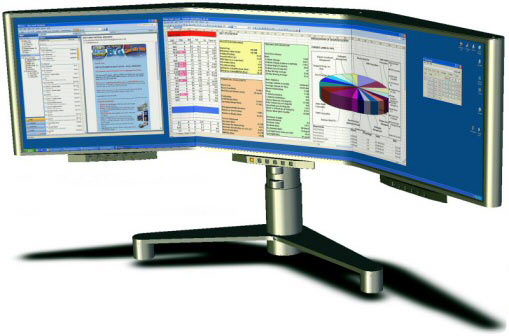
Fifth generation computing devices, based on artificial intelligence, are still in development, though there are some applications, such as voice recognition, that are being used today. The use of parallel processing and superconductors is helping to make artificial intelligence a reality. Quantum computation and molecular and nanotechnology will radically change the face of computers in years to come. The goal of fifth-generation computing is to develop devices that respond to natural language input and are capable of learning and self-organization.


Fifth generation computing devices, based on artificial intelligence, are still in development, though there are some applications, such as voice recognition, that are being used today. The use of parallel processing and superconductors is helping to make artificial intelligence a reality. Quantum computation and molecular and nanotechnology will radically change the face of computers in years to come. The goal of fifth-generation computing is to develop devices that respond to natural language input and are capable of learning and self-organization.


Artificial intelligence (AI) is the intelligence of machines and the branch of computer science that aims to create it. AI textbooks define the field as “the study and design of intelligent agents” where an intelligent agent is a system that perceives its environment and takes actions that maximize its chances of success. John McCarthy, who coined the term in 1956, defines it as “the science and engineering of making intelligent machines.”


The field was founded on the claim that a central property of humans, intelligence—the sapience of Homo sapiens—can be so precisely described that it can be simulated by a machine. This raises philosophical issues about the nature of the mind and the ethics of creating artificial beings, issues which have been addressed by myth, fiction and philosophy since antiquity. Artificial intelligence has been the subject of optimism, but has also suffered setbacks and, today, has become an essential part of the technology industry, providing the heavy lifting for many of the most difficult problems in computer science.


AI research is highly technical and specialized, deeply divided into subfields that often fail to communicate with each other. Subfields have grown up around particular institutions, the work of individual researchers, the solution of specific problems, longstanding differences of opinion about how AI should be done and the application of widely differing tools. The central problems of AI include such traits as reasoning, knowledge, planning, learning, communication, perception and the ability to move and manipulate objects. General intelligence (or “strong AI”) is still among the field’s long term goals.

DID YOU KNOW...?

An integrated circuit (IC) is a small electronic device made out of a semiconductor material. The first integrated circuit was developed in the 1950s by Jack Kilby of Texas Instruments and Robert Noyce of Fairchild Semiconductor.
Read more